> For the complete documentation index, see [llms.txt](https://help.citrusad.com/retail-media-interface/llms.txt). Markdown versions of documentation pages are available by appending `.md` to page URLs; this page is available as [Markdown](https://help.citrusad.com/retail-media-interface/retailer-reporting/product-reporting.md).
# Product reporting
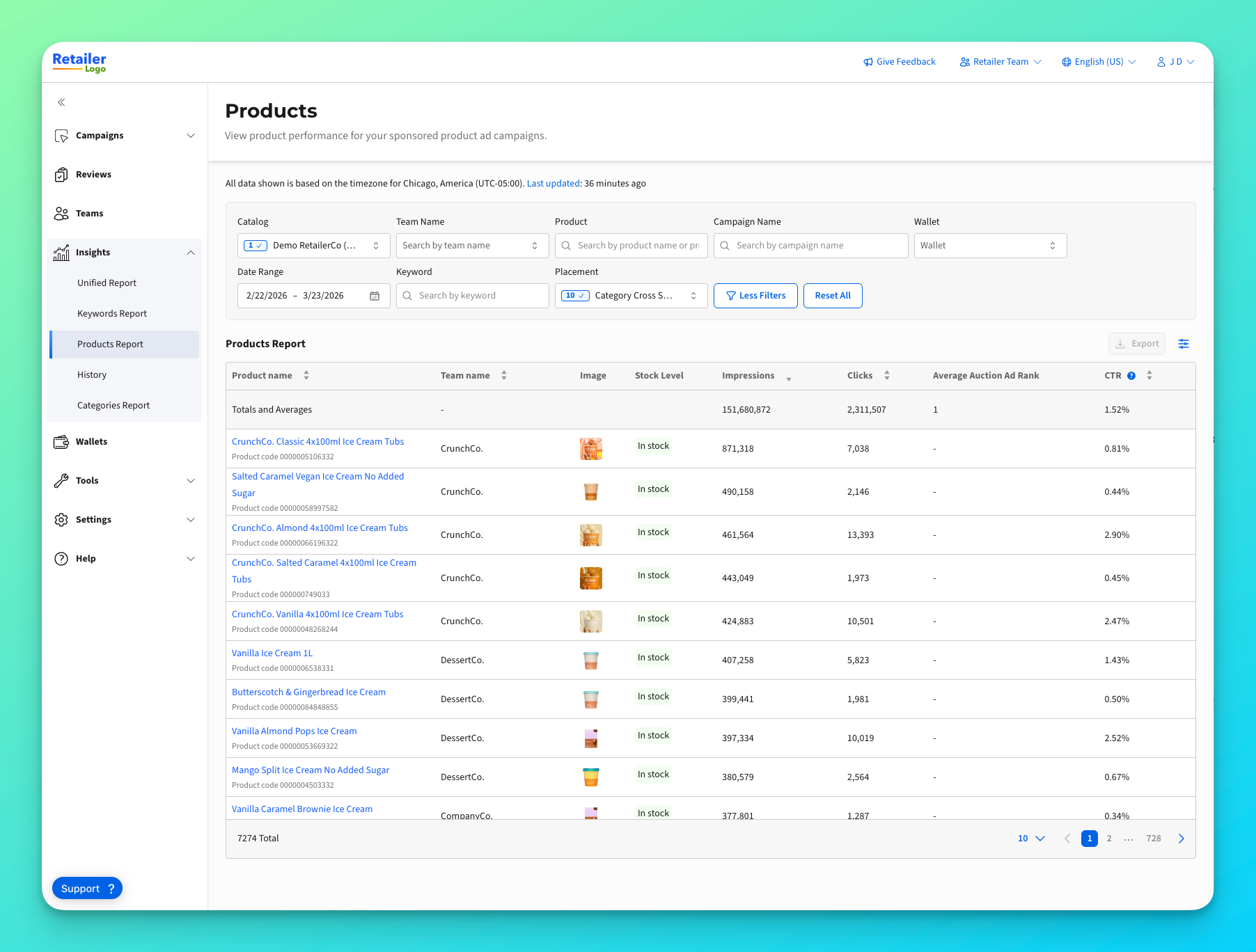
The Products Report gives you visibility into product performance across all advertiser campaigns on your platform. Monitor which products your advertisers are promoting, compare performance across teams, and understand advertising activity on your catalog.
***
### How to access the Products Report
You'll find the Products Report under **Reports** in the main navigation menu.
***
### Filtering your report
Use the filter bar to narrow down the data you want to see.
| Filter | Description |
| ----------------- | -------------------------------------------------------------------------------------- |
| **Catalog** | Select which product catalog to report on. Required when you have multiple currencies. |
| **Team Name** | Filter by specific advertiser teams, or view all teams combined |
| **Product** | Search for a specific product by name |
| **Campaign Name** | Search for products within a specific campaign |
| **Wallet** | Filter by funding wallet |
| **Date Range** | Choose your reporting period (defaults to last 30 days) |
| **Keyword** | Filter to a specific keyword |
| **Placement** | Filter to one or multiple selected placements |
***
### Understanding your report data
The report displays a table with performance metrics for each product. You can sort by any column by clicking the column header.
To view a definition of KPIs, read the [Reporting reference](/retail-media-interface/advertiser-reporting/reporting-reference.md)
***
### Customizing columns
You can choose which columns to display in your report.
1. Click the **column customizer** icon (grid icon) in the top-right corner of the table
2. Check or uncheck the metrics you want to see
3. Your preferences are saved automatically
***
### Exporting your data
To download your report as a CSV file:
1. Apply your desired filters
2. Click the **Export** button in the top-right corner
3. The CSV file will download with all visible data
{% hint style="warning" %}
Exports include up to 10,000 rows. If you have more products, narrow your filters or export in batches.
{% endhint %}
***
### Tips for success
* **Use the team filter** — Compare how different advertisers perform on similar products
* **Monitor high-value products** — Filter to products in key categories to ensure they're getting advertiser attention
* **Click to drill down** — Use the product click feature to see campaign-level details
* **Track trends over time** — Export data regularly to build historical comparisons
* **Sort by impressions** — See which products are getting the most advertising visibility on your platform
***
### Troubleshooting & support
| Issue | Resolution |
| ----------------------------- | ---------------------------------------------------------------------------------------------------- |
| Can't access Products Report | Retailer access requires enablement. Contact your Epsilon representative to request access. |
| Team Name filter not showing | Ensure you are in the retailer team. |
| "Select catalog to view data" | You have multiple currencies. Choose a specific catalog from the dropdown to load data. |
| Report shows no data | Check your date range includes active campaign periods. Try expanding the date range. |
| Missing metrics columns | Some metrics depend on your platform configuration. Contact support if expected metrics are missing. |
For help, contact your Epsilon Retail Media representative or use the Support tab within the platform.
---
# Agent Instructions
This documentation is published with GitBook. GitBook is the documentation platform designed so that both humans and AI agents can read, navigate, and reason over technical content effectively. Learn more at gitbook.com.
## Querying This Documentation
If you need additional information that is not directly available in this page, you can query the documentation dynamically by asking a question.
Perform an HTTP GET request on the current page URL with the `ask` query parameter, and the optional `goal` query parameter:
```
GET https://help.citrusad.com/retail-media-interface/retailer-reporting/product-reporting.md?ask=&goal=
```
`ask` is the immediate question: it should be specific, self-contained, and written in natural language.
`goal` is optional and describes the broader end goal you are ultimately trying to accomplish on behalf of the user. GitBook uses it to tailor the answer towards what is most useful for that goal.
The response will contain a direct answer to the question and relevant excerpts and sources from the documentation.
Use this mechanism when the answer is not explicitly present in the current page, you need clarification or additional context, or you want to retrieve related documentation sections.