> For the complete documentation index, see [llms.txt](https://help.citrusad.com/retail-media-interface/llms.txt). Markdown versions of documentation pages are available by appending `.md` to page URLs; this page is available as [Markdown](https://help.citrusad.com/retail-media-interface/retailer-admin/catalog-tool-and-product-tool.md).
# Catalog Tool & Product Tool
See how your catalog and products are configured on the platform. The Catalog Tool and Product Tool give you a read-only view of the settings the platform uses for your catalog and products — so you can confirm configuration and troubleshoot without raising a support request.
### Overview
The Catalog Tool and Product Tool show the configuration the platform currently holds for your catalog and products. Much of this information is set during feed ingestion or in administrative back-ends, so it isn't always visible to your team day-to-day. These tools surface it in one place.
Both tools are **read-only** — they show configuration but don't change it. Use them to confirm what's set, sanity-check before launching campaigns, and answer "what does the platform see?" questions quickly.
### Why use this feature?
* Confirm how your catalog is configured (currency, language, visibility, feeds) without asking support.
* Check a specific product's status — whether it's in the catalog, in stock, deleted, or filtered.
* Troubleshoot faster by seeing the platform's live view of your data.
### Prerequisites & availability
* **Where available:** Retailer teams with an ingested catalog.
* **Limitations:** Read-only — no editing. Empty if no catalog has been ingested.
#### How to access the Catalog and Product tools
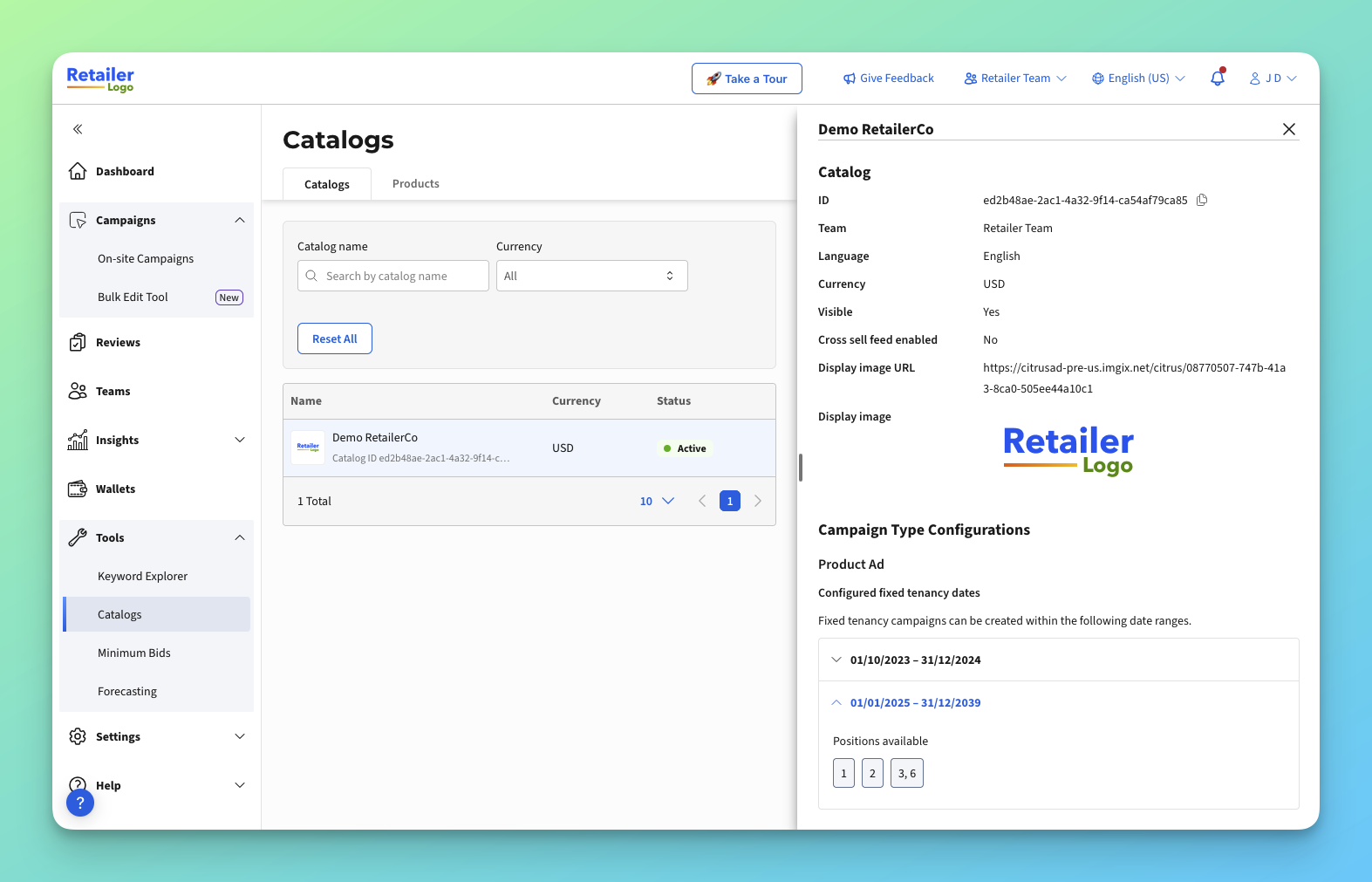
In a retailer team, navigate to the Tools section in the left navigation bar, then click Catalogs. You'll land on the catalog tab.
You can use the catalog tab to understand more about each catalog.
### Key Information
The tools display the following configuration:
**Catalog Tool**
* **Last Updated Date** — when the catalog data was last refreshed
* **Currency** and **Language** — commercial and localisation settings
* **Team** and **ID** — ownership and catalog identifier
* **Visible** — whether the catalog is active on the platform
* **Cross Sell Feed Enabled** — cross-sell feed integration status
* **Fixed Tenancy Date, Slot & Adtype configuration** — fixed-tenancy placement settings
**Product Tool**
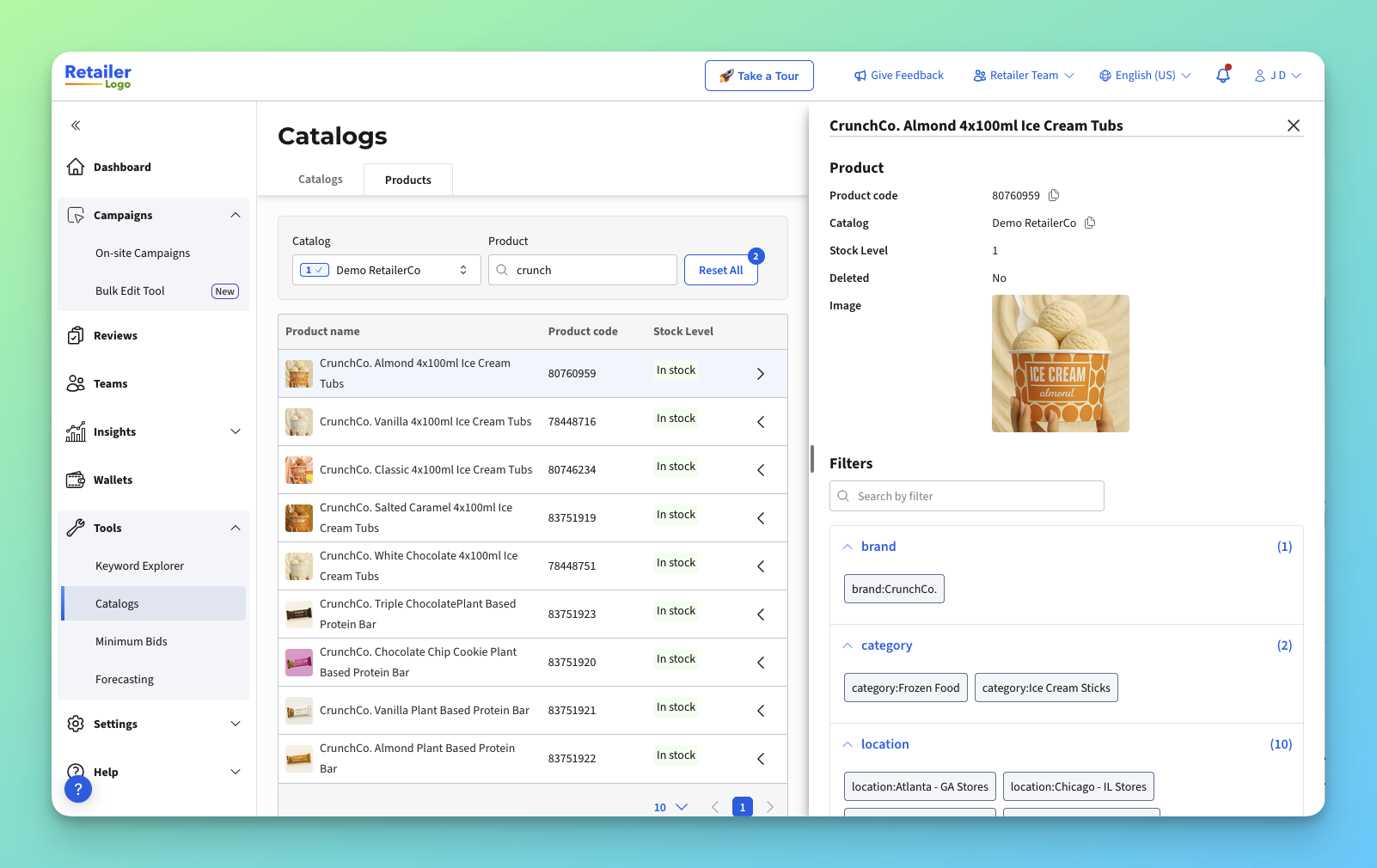
* **Product code** — the product identifier
* **Catalog** — the catalog the product belongs to
* **Stock Level** — current availability (In stock/ out of stock)
* **Deleted** — whether the product has been removed
* **Image** — whether a product image is present
* **Filters** — targeting/eligibility filters applied to the product. Note this only displays filters that are relevant to the product in the UI. For a full understanding of a product's filters, use .
#### Viewing your catalog configuration
1. **Open the Catalog Tool**
* Go to Settings → Retailer Teams and select the Catalog Tool.
* Review the catalog's current configuration and Last Updated Date.
#### Looking up a product
1. **Open the Product Tool**
* Go to Settings → Retailer Teams and select the Product Tool.
* Search for or select a product code to view its configuration and status.
#### Tips for success
* If a product isn't appearing in campaigns, check its **Deleted** state, **Stock Level**, and **Filters** in the Product Tool.
* If catalog data looks out of date, check the **Last Updated Date** — it reflects the most recent ingestion.
* Use these tools as your first check before raising a support request about configuration.
#### Troubleshooting & support
* **I can't see any catalogs:** Your catalog may not be ingested yet, or ingestion is still in progress. Check back shortly.
* **A product isn't found:** It may be deleted, not in the active catalog, or filtered out — check the Deleted and Catalog fields.
* **You can't see the tools:** The feature may not be enabled for your account yet. Contact your account manager.
* **I'm looking for other information that I can't find here:** We're continuing to explore new features for data access. Please consider raising a feature request with our support team.
* Still need help? Contact your account manager or .
---
# Agent Instructions
This documentation is published with GitBook. GitBook is the documentation platform designed so that both humans and AI agents can read, navigate, and reason over technical content effectively. Learn more at gitbook.com.
## Querying This Documentation
If you need additional information that is not directly available in this page, you can query the documentation dynamically by asking a question.
Perform an HTTP GET request on the current page URL with the `ask` query parameter, and the optional `goal` query parameter:
```
GET https://help.citrusad.com/retail-media-interface/retailer-admin/catalog-tool-and-product-tool.md?ask=&goal=
```
`ask` is the immediate question: it should be specific, self-contained, and written in natural language.
`goal` is optional and describes the broader end goal you are ultimately trying to accomplish on behalf of the user. GitBook uses it to tailor the answer towards what is most useful for that goal.
The response will contain a direct answer to the question and relevant excerpts and sources from the documentation.
Use this mechanism when the answer is not explicitly present in the current page, you need clarification or additional context, or you want to retrieve related documentation sections.