> For the complete documentation index, see [llms.txt](https://help.citrusad.com/retail-media-interface/llms.txt). Markdown versions of documentation pages are available by appending `.md` to page URLs; this page is available as [Markdown](https://help.citrusad.com/retail-media-interface/integration/generating-ads/banner-x-responsive/requesting-banner-x-ads.md).
# Generate banner X ads for different placements
This document provides a comprehensive guide on how to generate banner X advertisements for different placement types. Banner X ads are generated on `/bannerx` endpoint. All banner X requests require the `contentStandardId` and the `bannerSlotIds` you are requesting ads for. Each API request must also include details about the context, such as:
* Placement
* Catalog ID
* Customer ID
* Session ID
* Search term
* The maximum number of ads to display
## Search placement
### Prerequisites
You must complete the following steps before you start requesting banner X ads for search placement.
#### 1. Add product catalogs
Ensure that your products have been added to your catalogs and synced with the Epsilon Retail Media Platform. For more information, see [Introduction to Catalogs and Products](https://developers.citrusad.com/integration/docs/introduction-to-catalogs-and-products).
#### 2. Create a campaign and configure search terms
Ensure that you have created a campaign and configured search terms. For more details, refer to [Step 4b: Configure search terms](/retail-media-interface/integration/generating-ads/banner-x-responsive/create-banner-x-campaigns.md#optional-step-4b-configure-search-terms). Define the search terms that you want to target (include and exclude) for your product ads. You can specify exact match, phrase match, and negative search terms for your ads.
#### 3. Fetch API keys and base URL
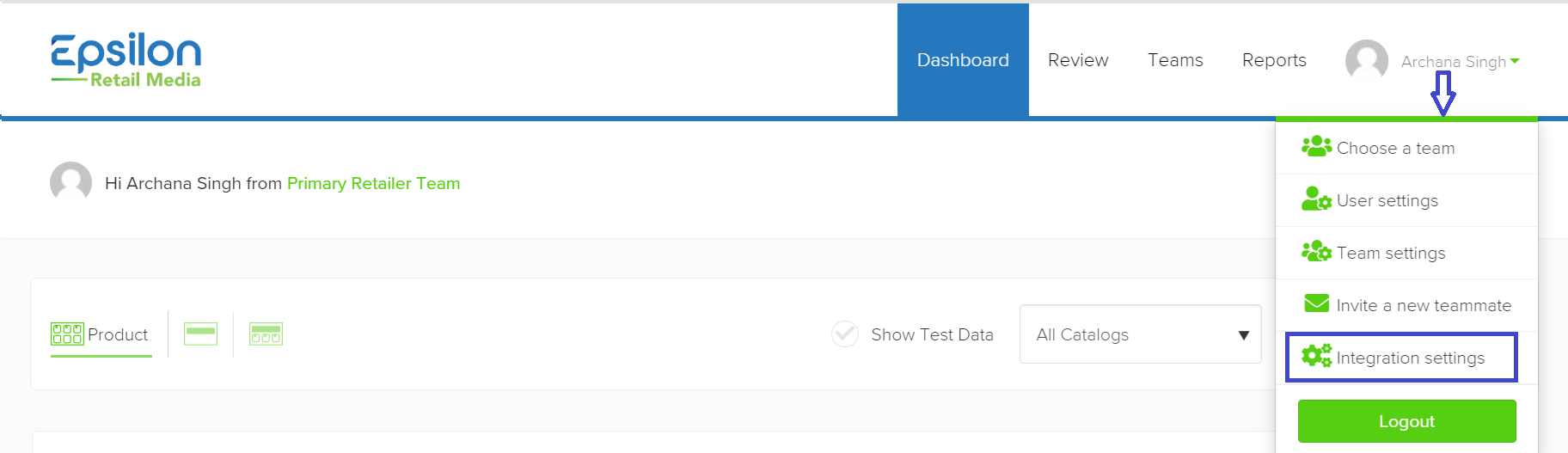
1. You must have a valid API key. To fetch the API keys, do the following:
1. Log into your Epsilon's Retail Media team account.
2. Navigate to the top right of the page and click on the drop-down menu.
3. Select **Integration Settings**, from the drop-down menu.
4. Click on the **API Key** tab. Your secret API key is initially hidden. To view it, click on the **Show** button. Once it becomes visible, copy your secret API key. Use this key for making API calls.
2. You must have the Base URL for the API endpoint. For example, HTTP/1.1. Check with your Technical Account Manager for the Base URL.
### Generate Ads
Perform the following steps to generate product ads.
#### HTTP Request
**Endpoint**: /v1/ads/generate
**Method**: POST
**Headers**:
* accept: application/json
* content-type: application/json
* Authorization: Basic \
#### Request Parameters
The request body should be a JSON object containing the following fields:
| Object | Type | Description |
| ----------------- | -------------------------------------- | ------------------------------------------------------------------------------------------------------------------------------------------------------------------------------------------------------------------------- |
| customerId | string, required | Unique identifier for the customer. This is provided by your retailer. |
| sessionId | string, required | Unique identifier for the session. This is required for the attribution and provided by the retailer. |
| contentStandardId | string, required | The content standard ID for your banner X. |
| bannerSlotIds | string, required | The slot ID of your banner X. |
| placement | string, required | Context in which the ad is displayed (e.g., "search"). |
| catalogId | string, required | Unique identifier for the product catalog from which products are being filtered. You can get the catalogID from the Epsilon's Retail Media UI or from the retailer. |
| maxNumberOfAds | integer, required | Maximum number of ads to display. When requesting banner x ads, you're able to specify the maximum number of banners you would like to receive per banner slot. You can control this with the `maxNumberOfAds` parameter. |
| searchTerm | string, required for search placements | Term to search for within the catalog. |
| options | object, optional | Additional options such as filtering modes `AndOr`. If specified, the system will use both "AND" and "OR" conditions to narrow down the search results. |
### Request example
Search placements are typically the easiest to request. They require a `searchTerm` to be specified in the request, like the example below:
```http
POST $BASE_URL/v1/ads/bannerx HTTP/1.1
accept: application/json
content-type: application/json
Authorization: Basic
{
"customerId": "wertg5432a",
"sessionId": "ec9-4e07-881d-3e9",
"placement": "search",
"catalogId": "628dbe95-2ec9-4e07-881d-3e9f92ab2e0b",
"searchTerm": "chocolate",
"options": {
"filterMode": "AndOr"
},
"contentStandardId": "c61941e2-1435-460b-9d2b-5d838e3dba9c",
"bannerSlotIds": [
{
"slotId": "",
"maxNumberOfAds": 1
},
{
"slotId": "",
"maxNumberOfAds": 2
}
]
}
```
## Category placements
Category placements require `productFilters` to be specified in the request. The example below shows where you would send the category filters:
```http
POST $BASE_URL/v1/ads/bannerx HTTP/1.1
accept: application/json
content-type: application/json
Authorization: Basic
{
"customerId": "wertg5432a",
"sessionId": "ec9-4e07-881d-3e9",
"placement": "category",
"catalogId": "628dbe95-2ec9-4e07-881d-3e9f92ab2e0b",
"productFilters": [
["category:Cupboard/Snacks"]
],
"options": {
"filterMode": "AndOr"
},
"contentStandardId": "fec2ab89-7a29-42b5-b58a-5675688b52d9",
"bannerSlotIds": [
{
"slotId": "",
"maxNumberOfAds": 1
},
{
"slotId": "",
"maxNumberOfAds": 2
}
}
```
As additional categories are perused, you should update your API call accordingly.
## Cross-sell category placements
Cross-sell category placements have a very similar request to category placements. You will want to specify the exact category you are requesting ads for. This is typically the page you are on. Specify the category in the `productFilters` of the request. The example below shows where you would send the category filters:
```http
POST $BASE_URL/v1/ads/generate HTTP/1.1
accept: application/json
content-type: application/json
Authorization: Basic
{
"customerId": "wertg5432a",
"sessionId": "ec9-4e07-881d-3e9",
"placement": "category-cross-sell",
"catalogId": "628dbe95-2ec9-4e07-881d-3e9f92ab2e0b",
"productFilters": [
["category:Cupboard/Snacks"]
],
"options": {
"filterMode": "AndOr"
},
"contentStandardId": "fec2ab89-7a29-42b5-b58a-5675688b52d9",
"bannerSlots": [
{
"slotId": "",
"maxNumberOfAds": 1
},
{
"slotId": "",
"maxNumberOfAds": 2
}
],
"maxNumberOfAds": 3
}
```
As additional categories are perused, you need to update your API call accordingly.
{% hint style="info" %}
Merging organic and cross-sell category targeting?
If you're looking to merge an organic and cross-sell category ad request into a single placement, you will need to implement merging and delivery logic to your customers. This is the integrator's responsibility, though Epsilon Retail Media is happy to be consulted.
In general, we advise that you show organic category ads, and position and category cross-sell advertisements after the organic placements.
{% endhint %}
## Broad match placements
Broad placements such as home or checkout pages do not require any `productFilters` to be specified in the request. Any filters the retailer would like to specify (on offer, new, etc.) can be specified in the `productFilters` to ensure Epsilon Retail Media only serve ads within the requirements, like the example below:
```http
POST $BASE_URL/v1/ads/bannerx HTTP/1.1
accept: application/json
content-type: application/json
Authorization: Basic
{
"customerId": "wertg5432a",
"sessionId": "ec9-4e07-881d-3e9",
"placement": "home",
"catalogId": "628dbe95-2ec9-4e07-881d-3e9f92ab2e0b",
"productFilters": [
[]
],
"options": {
"filterMode": "AndOr"
},
"contentStandardId": "fec2ab89-7a29-42b5-b58a-5675688b52d9",
"bannerSlotIds": [
{
"slotId": "",
"maxNumberOfAds": 1
},
{
"slotId": "",
"maxNumberOfAds": 2
}
}
```
## Request enhancements
We advise you to consider the below enhancements to enhance your user experience.
#### Filtered searches
If your customer filters their search, you can extend your context to provide `productFilters`. Below is an example where the customer is filtering by the category "Cupboard" and the dietary restriction "Gluten-free". This same principle can be applied to any category or broad match placement.
```http
POST $BASE_URL/v1/ads/bannerx HTTP/1.1
accept: application/json
content-type: application/json
Authorization: Basic
{
"customerId": "wertg5432a",
"sessionId": "ec9-4e07-881d-3e9",
"placement": "search",
"catalogId": "628dbe95-2ec9-4e07-881d-3e9f92ab2e0b",
"searchTerm": "chocolate",
"productFilters": [
["category:Cupboard"],["dietary:Gluten-free"]
],
"options": {
"filterMode": "AndOr"
},
"contentStandardId": "fec2ab89-7a29-42b5-b58a-5675688b52d9",
"bannerSlotIds": [
{
"slotId": "",
"maxNumberOfAds": 1
},
{
"slotId": "",
"maxNumberOfAds": 2
}
}
```
#### Filtering by location
If you are synchronising location filters in your catalog, you can extend your context to provide the customer's store location in the `productFilters`, like the example below:
```http
POST $BASE_URL/v1/ads/bannerx HTTP/1.1
accept: application/json
content-type: application/json
Authorization: Basic
{
"customerId": "wertg5432a",
"sessionId": "ec9-4e07-881d-3e9",
"placement": "search",
"catalogId": "628dbe95-2ec9-4e07-881d-3e9f92ab2e0b",
"searchTerm": "chocolate",
"productFilters": [
["category:Cupboard"],["dietary:Gluten-free"],["location:Westenbury"]
],
"options": {
"filterMode": "AndOr"
},
"contentStandardId": "fec2ab89-7a29-42b5-b58a-5675688b52d9",
"bannerSlotIds": [
{
"slotId": "",
"maxNumberOfAds": 1
},
{
"slotId": "",
"maxNumberOfAds": 2
}
}
```
## Banner X response
All responses follow the same JSON format. All content required to render the banner is provided in the response. If the banner does not have a component configured (such as no secondary hero image), Epsilon Retail Media will not serve the property.
```json
{
"ads": [
{
"contentStandardId": "c619d1e2-1435-460b-9d2b-5d838e3dba9c",
"slotId": "",
"banners": [
{
"citrusAdId": "shotgun__vW5pOojxDfN7T9VwaXWQLF2wKw3NzE0MTA3",
"citrusCampaignName": "CitrusAd-Example-Category-Banner-X-Ad-52793b405f1347b22e72a38c5a08699b",
"citrusContentStandardId": "c619d1e2-1435-460b-9d2b-5d838e3dba9c",
"citrusSlotId": "",
"citrusExpiry": "2021-05-17T02:47:52.849995214Z",
"headingText": "Banner Advertisement for Magnum Double Ice Cream with a product image and shop now button",
"bannerText": "Magnum Double Ice Cream",
"bannerTextColour": "6e6c6c",
"ctaFlag": true,
"ctaText": "Shop now",
"ctaTextAccessibility": "for Magnum products",
"ctaLink": "https://www.tesco.com/groceries/en-GB/search?query=magnums",
"backgroundColour": "e1d6ac",
"heroImage": "https://cdn.flavedo.io/s/9b93e7f9-d747-4c8b-bcba-2357b280a3b3",
"heroImageAltText": "Magnums",
"tags": {},
"gtins": [
"7714107",
"7733636",
"7733657",
"7163379",
"7733628"
],
"position": 1
}
]
},
{
"contentStandardId": "c619d1e2-1435-460b-9d2b-5d838e3dba9c",
"slotId": "",
"banners": [
{
"citrusAdId": "shotgun_kZp9yTCMm71vTo7iyQaK9I_YB09FUFYzNzBTQ0FO",
"citrusCampaignName": "milo-campaign-lakjsdf09kj",
"citrusContentStandardId": "21r372ba-dce6-46f2-bd16-1b923b9189f9",
"citrusSlotId": "",
"citrusExpiry": "2021-05-17T02:47:52.849995214Z",
"headingText": "A banner for Milo with a product image and a shop now button",
"bannerText": "Try Milo Cereal",
"bannerTextColour": "48a94c",
"heroImage": "https://assets.imageurl.io/s/85d2d333-eed5-44d7-b131-8851d59f0574",
"heroImageAltText": "Milo product image",
"ctaFlag": true,
"ctaText": "Shop now",
"ctaTextAccessibility": "for Milo products",
"ctaLink": "retailer.com/everything/search/heritage%20mill?pageNumber=1",
"secondaryHeroImage": "https://assets.imageurl.io/s/85d2d333-eed5-44d7-b131-8m435c34r",
"secondaryHeroImageAltText": "Milo Logo",
"secondaryHeroMode": "landscape",
"backgroundColour": "895b5b",
"backgroundImage": "https://assets.flavedo.io/s/9c6fa248-c5ff-4341-9833-7e2b08464ada",
"backgroundImagePosition": "FILL",
"secondaryBackgroundImage": "https://assets.flavedo.io/s/9c6fa248-c5ff-4341-9833-7e2b08464ada",
"tags": {},
"gtins": [
"16309011",
"57312011",
"65250011"
],
"position": 1
}
]
}
]
}
```
The `id` field is your Ad ID used in impression and click reports. Please refer to the reference for more information on each string.
### Third-party tracking tags
For banner X ads, Epsilon Retail Media supports the passing of third-party tracking tags to the retailer. These tags are used by advertisers to verify their performance by a trusted third party.
Epsilon Retail Media support the tracking tags below:
* DoubleVerify (Javascript and Image)
* DCM Click
* DCM Impression
* IAS
* Adform Impression
* Adform click
If a campaign has a tracking tag configured, it will present as the relevant field in the `trackingTags` object below. Please note, if a campaign does not have a tag configured, the `tags`and `trackingTags` object will remain empty.
```json
{
"ads": [
{
"contentStandardId": "c619d1e2-1435-460b-9d2b-5d838e3dba9c",
"slotId": "",
"banners": [
{
"citrusAdId": "shotgun__vW5pOojxDfN7T9VwaXWQLF2wKw3NzE0MTA3",
"citrusCampaignName": "CitrusAd-Example-Category-Banner-X-Ad-52793b405f1347b22e72a38c5a08699b",
"citrusContentStandardId": "c619d1e2-1435-460b-9d2b-5d838e3dba9c",
"citrusSlotId": "",
"citrusExpiry": "2021-05-17T02:47:52.849995214Z",
"headingText": "Banner Advertisement for Magnum Double Ice Cream with a product image and shop now button",
"bannerText": "Magnum Double Ice Cream",
"bannerTextColour": "6e6c6c",
"ctaFlag": true,
"ctaText": "Shop now",
"ctaTextAccessibility": "for Magnum products",
"ctaLink": "https://www.tesco.com/groceries/en-GB/search?query=magnums",
"backgroundColour": "e1d6ac",
"heroImage": "https://cdn.flavedo.io/s/9b93e7f9-d747-4c8b-bcba-2357b280a3b3",
"heroImageAltText": "Magnums",
"tags": {},
"trackingTags": {
"ADFORM_CLICK": "https://track.adform.net...",
"ADFORM_IMPRESSION": "\n\n \n \n CitrusAd\n \n \n \n \n \n \n VAST-4.0-Short-Intro.mp4\n \n \n VAST-4.0-Short-Intro.mp4\n \n \n \n \n \n \n \n \n \n \n \n \n \n \n \n"
}
]
}
]
}
```
### Companion products
If a campaign has companion products configured, the response includes a `companionProducts`array of objects as can be seen below::
```
{
"ads": [
{
"contentStandardId": "c47c9ca2-ad3b-48cc-880b-e899c1661726",
"slotId": "Top_Banner",
"banners": [
{
"citrusAdId": "shotgun_8SvgA7OvvuwtZkkOKR0vr8AXMvQKFgoURmluZ2VybGltZTI2LWZkeHZxMjcSABoMCO30r70GEKPplJQCIgIIAQ==",
"citrusCampaignName": "Ads:74-330-96832622ed499dafb3da8de8b76340a2",
"citrusContentStandardId": "c47c9ca2-ad3b-48cc-880b-e899c1661726",
"citrusSlotId": "Top_Banner",
"citrusExpiry": "2025-02-12T01:33:33.579155107Z",
"headingText": "recusandae 3205",
"bannerText": "placeat 2825",
"bannerTextColour": "ffffff",
"ctaFlag": true,
"ctaText": "CTA text",
"ctaTextAccessibility": "call to action accessibility text",
"ctaLink": http://citrusad.com,
"backgroundColour": "000000",
"backgroundImage": https://dev3.flavedo.io./citrus/8de07ed9-60b4-4611-8bd5-3f1f0c0b6be4,
"secondaryBackgroundImage": https://dev3.flavedo.io./citrus/b7a70785-1366-42c6-8134-c7fe47a30c34,
"secondaryBackgroundImagePosition": "rightaligned",
"heroImage": https://dev3.flavedo.io./citrus/26798ca9-1022-422d-9100-1a3687c88372,
"heroImageAltText": "hero image alt text",
"secondaryHeroImage": https://dev3.flavedo.io./citrus/c4ee18b4-bf51-44d7-9eb6-eeb1dc4c422f,
"secondaryHeroImageAltText": "secondary hero image alt text",
"secondaryHeroMode": "landscape",
"tags": {},
"additionalFields": [
{
"id": "text-1",
"value": "sed 5731"
}
],
"gtins": [
"Fingerlime26-fdxvq27",
"Oranges5-qgxeb6",
"Cherries9-adkoj11",
"Incaberries20-ppscn21",
"Banana14-simfk15"
],
"sellerId": "seller_id_772_659",
"position": 1,
"metadata": {
"advertiserInfo": {
"advertiser": "Bob's advertising agency",
"onBehalfOf": "Brand company inc"
}
},
“companionProducts”: [
"Banana14-simfk15"
"Oranges5-qgxeb6",
"Incaberries20-ppscn21",
]
}
]
}
]
}
```
### Marketplace sellerId
If onboarding marketplace sellers, you may see an additional `sellerId` per ad in the response. This will only appear if the team that owns the campaign being served has a seller ID configured in the UI. The example below shows one ad with a sellerId, one without.
```json
{
"ads": [
{
"contentStandardId": "c619d1e2-1435-460b-9d2b-5d838e3dba9c",
"slotId": "",
"banners": [
{
"citrusAdId": "shotgun__vW5pOojxDfN7T9VwaXWQLF2wKw3NzE0MTA3",
"citrusCampaignName": "CitrusAd-Example-Category-Banner-X-Ad-52793b405f1347b22e72a38c5a08699b",
"citrusContentStandardId": "c619d1e2-1435-460b-9d2b-5d838e3dba9c",
"citrusSlotId": "",
"citrusExpiry": "2021-05-17T02:47:52.849995214Z",
"headingText": "Banner Advertisement for Magnum Double Ice Cream with a product image and shop now button",
"bannerText": "Magnum Double Ice Cream",
"bannerTextColour": "6e6c6c",
"ctaFlag": true,
"ctaText": "Shop now",
"ctaTextAccessibility": "for Magnum products",
"ctaLink": "https://www.retailer.com/groceries/en-GB/search?query=magnums",
"backgroundColour": "e1d6ac",
"heroImage": "https://cdn.flavedo.io/s/9b93e7f9-d747-4c8b-bcba-2357b280a3b3",
"heroImageAltText": "Magnums",
"tags": {},
"gtins": [
"7714107",
"7733636",
"7733657",
"7163379",
"7733628"
],
"position": 1,
"sellerId": "1ben32-ss3d43-amea"
}
]
},
{
"contentStandardId": "c619d1e2-1435-460b-9d2b-5d838e3dba9c",
"slotId": "",
"banners": [
{
"citrusAdId": "shotgun_kZp9yTCMm71vTo7iyQaK9I_YB09FUFYzNzBTQ0FO",
"citrusCampaignName": "milo-campaign-lakjsdf09kj",
"citrusContentStandardId": "21r372ba-dce6-46f2-bd16-1b923b9189f9",
"citrusSlotId": "",
"citrusExpiry": "2021-05-17T02:47:52.849995214Z",
"headingText": "A banner for Milo with a product image and a shop now button",
"bannerText": "Try Milo Cereal",
"bannerTextColour": "48a94c",
"heroImage": "https://assets.imageurl.io/s/85d2d333-eed5-44d7-b131-8851d59f0574",
"heroImageAltText": "Milo product image",
"ctaFlag": true,
"ctaText": "Shop now",
"ctaTextAccessibility": "for Milo products",
"ctaLink": "retailer.com/everything/search/heritage%20mill?pageNumber=1",
"secondaryHeroImage": "https://assets.imageurl.io/s/85d2d333-eed5-44d7-b131-8m435c34r",
"secondaryHeroImageAltText": "Milo Logo",
"secondaryHeroMode": "landscape",
"backgroundColour": "895b5b",
"backgroundImage": "https://assets.flavedo.io/s/9c6fa248-c5ff-4341-9833-7e2b08464ada",
"backgroundImagePosition": "FILL",
"secondaryBackgroundImage": "https://assets.flavedo.io/s/9c6fa248-c5ff-4341-9833-7e2b08464ada",
"tags": {},
"gtins": [
"16309011",
"57312011",
"65250011"
],
"position": 1
}
]
}
]
}
```
### Third-party tracking tags
Epsilon Retail Media supports the passing of third-party tracking tags to the retailer. These tags are used by advertisers to verify their performance by a trusted third party.
Epsilon Retail Media support the tracking tags below:
* DoubleVerify
* DCM Click
* DCM Impression
* IAS
If a campaign has a tracking tag configured, it will present as the relevant field in the `tags` object below. Please note, if a campaign does not have a tag configured, the `tags` object will remain empty.
```json
{
"ads": [],
"banners": [
{
"id": "banner_XeemTeq59HapGSp4vccOYfBq_yvc3zMzNjM2",
"contentStandardId": "fec2ab89-7a29-42b5-b58a-5675688b52d9",
"slotId": "",
"imageUrl": "https://cdn.flavedo.io/s/-oW-C3cEViSSO2krWkwOBUXOhvUdhHOySx-YQLGZ1lA=",
"linkUrl": "https://www.retailer.com/link",
"altText": "Your local ice cream",
"text": "",
"gtins": [
"7733628",
"7714107",
"7163379",
"7733636",
"7733657"
],
"expiry": "2021-05-17T01:49:17.75503253Z",
"tags": {
"dv": "",
"dcmClick": "",
"dcmImpression": "",
"ias": "" }
}
],
"products": [],
"memoryToken":"85ykKVv-luDHMWLZx2d6xcPq6sF7CgkJCSJDb3VudGVyIjogIjIiLAoJCQkiQWRzIjogWwoJCQkJImRpc3BsYXlfV05VV0NwQkRKMUpKNm5wdVZSVExvOU40TUxzNE1UWTBOemt5TWc9PSIsCgkJCQkiZGlzcGxheV9MME5NUHRxNmdCcVFvREJOd3J0dE9UTGJoWk0xTVRFeU9UYzRPUT09IiwKCQkJCSJkaXNwbGF5XzlCcEpmdUpaWk9VXzgyaWpFM3VCczgxd3VVczRNekkwTnpVeE5nPT0iLAoJCQkJImRpc3BsYXlfcW1VU1p4TkpMQ0lqeWQwdTFJRDk0RmxVZ0pnNE16STBOelV4Tnc9PSIsCgkJCQkiZGlzcGxheV9oeHlFZktCUnRrNWlxMThMQzE1SDJHcEN3QjgxTVRFeU9UYzVNQT09IiwKCQkJCSJkaXNwbGF5X1NkcjFEcU5aUEFtcGh0Q1FIUndoYUxFT1B0RXhNamsxT1RJNE5BPT0iLAoJCQkJImRpc3BsYXlfeVlSai1qV2Ntc2ozNzhrel9PMm0yOVlwTjhJeE5EazNPRE00TXc9PSIsCgkJCQkiZGlzcGxheV9Xbm9NZGZuLTRTVmhxcF9xQzVvLWxoT0paNm8xTkRJeE1UUTROdz09IgoJCQldLAoJCQkiVFRMIjogMTYyODk4NTYwMAoJCX0="
}
```
As Epsilon Retail Media is a server-to-server integration, third-party tracking tags require additional development by the retailer.
## Digital Services Act
Epsilon Retail Media assists retailers in meeting their European Union (EU) [Digital Services Act](https://commission.europa.eu/strategy-and-policy/priorities-2019-2024/europe-fit-digital-age/digital-services-act_en) (DSA) obligations. The DSA establishes a unified set of rules across the EU, targeting the regulation of online content, transparent advertising, and disinformation. For more information, see [Digital Services Act](/retail-media-interface/integration/feature-integrations/digital-services-act.md).
### Example ad request
```
{
"catalogId": "57a5318b-5349-46fd-80ed-fd2e0be15819",
"contentStandardId": "c47c9ca2-ad3b-48cc-880b-e899c1661726",
"bannerSlotIds": [
{
"slotId": "Top_Banner",
"maxNumberOfAds": 1
}
],
"customerId": "velit3193",
"placement": "broad-display-60e9699d-984f-4a80-9383-2e6dc7a68d03",
"options": {
"includeAdvertiserInfo": true
}
}
```
### Example ad response
```
{
"ads": [
{
"contentStandardId": "c47c9ca2-ad3b-48cc-880b-e899c1661726",
"slotId": "Top_Banner",
"banners": [
{
"citrusAdId": "shotgun_8SvgA7OvvuwtZkkOKR0vr8AXMvQKFgoURmluZ2VybGltZTI2LWZkeHZxMjcSABoMCO30r70GEKPplJQCIgIIAQ==",
"citrusCampaignName": "Ads:74-330-96832622ed499dafb3da8de8b76340a2",
"citrusContentStandardId": "c47c9ca2-ad3b-48cc-880b-e899c1661726",
"citrusSlotId": "Top_Banner",
"citrusExpiry": "2025-02-12T01:33:33.579155107Z",
"headingText": "recusandae 3205",
"bannerText": "placeat 2825",
"bannerTextColour": "ffffff",
"ctaFlag": true,
"ctaText": "CTA text",
"ctaTextAccessibility": "call to action accessibility text",
"ctaLink": "http://citrusad.com",
"backgroundColour": "000000",
"backgroundImage": "https://dev3.flavedo.io./citrus/8de07ed9-60b4-4611-8bd5-3f1f0c0b6be4",
"secondaryBackgroundImage": "https://dev3.flavedo.io./citrus/b7a70785-1366-42c6-8134-c7fe47a30c34",
"secondaryBackgroundImagePosition": "rightaligned",
"heroImage": "https://dev3.flavedo.io./citrus/26798ca9-1022-422d-9100-1a3687c88372",
"heroImageAltText": "hero image alt text",
"secondaryHeroImage": "https://dev3.flavedo.io./citrus/c4ee18b4-bf51-44d7-9eb6-eeb1dc4c422f",
"secondaryHeroImageAltText": "secondary hero image alt text",
"secondaryHeroMode": "landscape",
"tags": {},
"additionalFields": [
{
"id": "text-1",
"value": "sed 5731"
}
],
"gtins": [
"Fingerlime26-fdxvq27",
"Oranges5-qgxeb6",
"Cherries9-adkoj11",
"Incaberries20-ppscn21",
"Banana14-simfk15"
],
"sellerId": "seller_id_772_659",
"position": 1,
"metadata": {
"advertiserInfo": {
"advertiser": "Bob's advertising agency",
"onBehalfOf": "Brand company inc"
}
}
}
]
}
]
}
```
---
# Agent Instructions
This documentation is published with GitBook. GitBook is the documentation platform designed so that both humans and AI agents can read, navigate, and reason over technical content effectively. Learn more at gitbook.com.
## Querying This Documentation
If you need additional information that is not directly available in this page, you can query the documentation by asking a question.
Perform an HTTP GET request on the following URL with the `ask` and `goal` query parameters:
```
GET https://help.citrusad.com/retail-media-interface/integration/generating-ads/banner-x-responsive/requesting-banner-x-ads.md?ask=&goal=
```
`ask` is the immediate question: it should be specific, self-contained, and written in natural language.
`goal` is what the user is ultimately trying to achieve, the reason they need the answer. Sharing it helps GitBook give you a better, more relevant answer. A goal is most helpful when it describes the outcome the user wants rather than restating the question. For example, with `ask=how do I create an API token`, a goal like `automate deployments from our CI pipeline` lets GitBook tailor the answer to that use case.
The response will contain a direct answer to the question and relevant excerpts and sources from the documentation.
Use this mechanism when the answer is not explicitly present in the current page, you need clarification or additional context, or you want to retrieve related documentation sections.