> For the complete documentation index, see [llms.txt](https://help.citrusad.com/retail-media-interface/llms.txt). Markdown versions of documentation pages are available by appending `.md` to page URLs; this page is available as [Markdown](https://help.citrusad.com/retail-media-interface/integration/feature-integrations/marketplace-sellerid.md).
# Marketplace sellerId
## What is a marketplace?
Marketplaces are a unique opportunity for retailers to expand online presence as well as engage new or casual buyers with ease. Marketplaces allow smaller businesses to reach a wide variety of customers, typically shipped directly by the marketplace seller to the customer.
Marketplaces enable sellers to sell their products on a retailer’s site, increasing their product visibility to a wider audience. While retailers gain additional product offerings to sell to a wider range of customers.
In addition to monetizing your site with marketplace capabilities; retailers can also capitalise on this premium online shelf space and offer the opportunity for marketplace vendors to bid for top positions via Epsilon Retail Media through the documentation listed below.
## Setting up marketplace advertisers
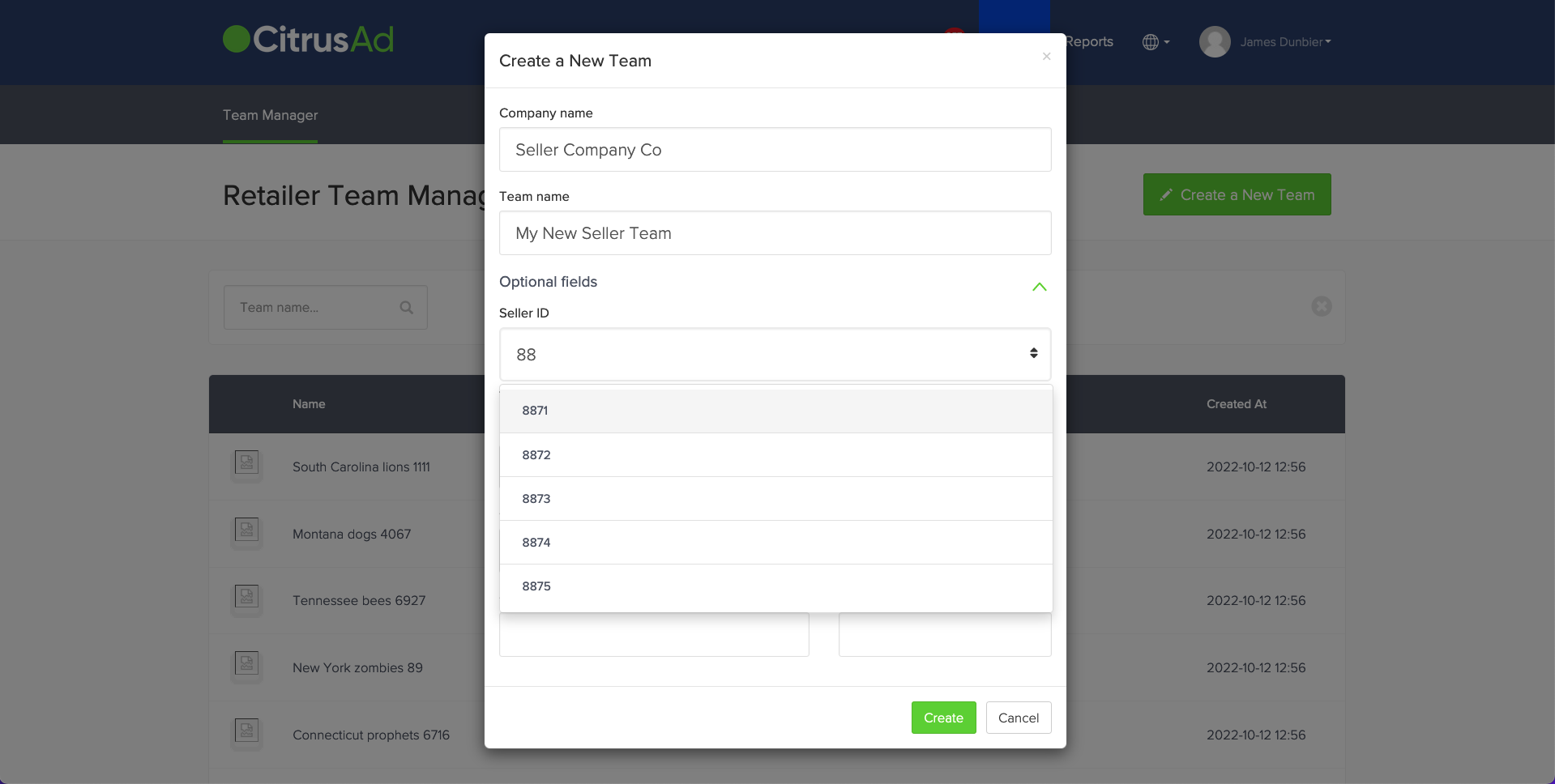
Once your integration enhancements are complete (detailed below), you will be able to set a Seller ID per team. This can only be done when creating a team from the retailer team, this cannot be done when editing a team or by a supplier.
There is an "Optional fields" section when creating a new team where the Seller ID can be selected. The Seller IDs able to be selected are sourced directly from your product catalog. You cannot enter a value that is not present in the product catalog.
## Integration requirements
### High level overview
In addition to a standard integration with Epsilon Retail Media, your integration will need to be enhanced with the below changes:
* Implement a sellerId per product in the product catalog file or API
* Parse ad response and render the correct seller’s offer when relevant
* Report a sellerId per unique product when reporting orders to Epsilon Retail Media
{% hint style="warning" %}
Currently, Epsilon Retail Media's feature does not fully cater to the use case where a seller of a product has no seller ID, and there are also seller ID variants of products. An identified workaround for this is to synchronise a retailer seller ID on any non-marketplace product, and each supplier that is not a marketplace seller must have this seller ID added. Please contact your technical account manager to learn more.
{% endhint %}
### Product catalog enhancements.
In your product catalog synchronised with Citrus, you will need to provide a sellerId per unique product code to Epsilon Retail Media.
#### Syncing catalog via file
You will need to add an additional column/section to your catalog file of `seller_id`. Every `seller_id` and `product_code` combination must be a unique row. For non marketplace products, the `seller_id` can be empty.
{% hint style="warning" %}
Products that have both a brand seller (where the product has no sellerId) and marketplace sellers (where the same product has sellerId variants) are currently incompatible. If you have products that fall into this category, we recommend that you only onboard marketplace sellers for these specific products at this time.
If your ecommerce site is set up with this particular use case of products, we request that you raise this issue with your Epsilon Retail Media contact as we are considering making this use case compatible.
{% endhint %}
For examples, please visit [Syncing catalog and product via file](/retail-media-interface/integration/data-api/catalog-products-2/syncing-catalog-products-via-file.md)
#### Syncing catalog via API
When synchronising products via API, you will need to synchronise a `sellerId` per unique `sellerId` & `gtin` combination.
```http
POST $BASE_URL/v1/catalog-products?teamId= HTTP/1.1
accept: application/json
content-type: application/json
Authorization: Basic
{
"catalogProducts": [
{
"catalogId": "628dbe95-2ec9-4e07-881d-3e9f92ab2e0b",
"gtin": "23556578965543",
"sellerId": "327272-sade2-3ja",
"dtmCookieId": "AAAF8xLBTA968AB6TOthAAAAAAE",
"inventory": 50,
"price": "19.99",
"tags": [
"imageurl:https://your.image.host.com/image.jpg",
"name:Covergirl Clean 120 Creamy Natural Liquid Foundation30mL"
],
"filters": [
"category:Health&Beauty",
"category:Grocery",
"Brand:Covergirl",
"Special_Flag:0"
],
"profit": "1.50"
},
{
"catalogId": "628dbe95-2ec9-4e07-881d-3e9f92ab2e0b",
"gtin": "23556578965543",
"sellerId": "09sa-d32s--faasw",
"inventory": 50,
"price": "19.99",
"tags": [
"imageurl:https://your.image.host.com/image.jpg",
"name:Covergirl Clean 120 Creamy Natural Liquid Foundation30mL"
],
"filters": [
"category:Health&Beauty",
"category:Grocery",
"Brand:Covergirl",
"Special_Flag:0"
],
"profit": "1.50"
},
{
"catalogId": "628dbe95-2ec9-4e07-881d-3e9f92ab2e0b",
"gtin": "23556578965738",
"inventory": 26,
"price": "8.50",
"tags": [
"imageurl:https://your.image.host.com/image.jpg",
"name:Kelloggs Froot Loops Breakfast Cereal 500g"
],
"filters": [
"Brand:Kelloggs",
"category:Pantry",
"category:BreakfastFoods",
"category:Cereals",
"Special_Flag:0"
],
"profit": "0.50"
}
]
}
```
### Ad response enhancements
When Epsilon Retail Media serves ads, a `sellerId` will be served if the `gtin` has one associated with it. This applies to all ad types, but is only relevant for ad rendering from product ads. An example product ad response is below:
```json
{
"ads": [
{
"id": "display_QqHaKRrKlFm1Wxr9c_DXJN4HSE3NzMzNjM2",
"gtin": "7733636",
"discount": {
"amount": 0,
"minPrice": 0,
"maxPerCustomer": 0
},
"expiry": "2021-05-12T04:17:50.400902957Z",
"position": 1
},
{
"id": "display_NzsHqP0_iQedlo9VnrO2vqkwi_k3NzMzNjI4",
"gtin": "7733628",
"sellerId": "2834-ascre-2wcr4",
"discount": {
"amount": 0,
"minPrice": 0,
"maxPerCustomer": 0
},
"expiry": "2021-05-12T04:17:50.400908257Z",
"position": 2
}
],
"banners": [],
"products": [],
"memoryToken":"85ykKVv-luDHMWLZx2d6xcPq6sF7CgkJCSJDb3VudGVyIjogIjIiLAoJCQkiQWRzIjogWwoJCQkJImRpc3BsYXlfV05VV0NwQkRKMUpKNm5wdVZSVExvOU40TUxzNE1UWTBOemt5TWc9PSIsCgkJCQkiZGlzcGxheV9MME5NUHRxNmdCcVFvREJOd3J0dE9UTGJoWk0xTVRFeU9UYzRPUT09IiwKCQkJCSJkaXNwbGF5XzlCcEpmdUpaWk9VXzgyaWpFM3VCczgxd3VVczRNekkwTnpVeE5nPT0iLAoJCQkJImRpc3BsYXlfcW1VU1p4TkpMQ0lqeWQwdTFJRDk0RmxVZ0pnNE16STBOelV4Tnc9PSIsCgkJCQkiZGlzcGxheV9oeHlFZktCUnRrNWlxMThMQzE1SDJHcEN3QjgxTVRFeU9UYzVNQT09IiwKCQkJCSJkaXNwbGF5X1NkcjFEcU5aUEFtcGh0Q1FIUndoYUxFT1B0RXhNamsxT1RJNE5BPT0iLAoJCQkJImRpc3BsYXlfeVlSai1qV2Ntc2ozNzhrel9PMm0yOVlwTjhJeE5EazNPRE00TXc9PSIsCgkJCQkiZGlzcGxheV9Xbm9NZGZuLTRTVmhxcF9xQzVvLWxoT0paNm8xTkRJeE1UUTROdz09IgoJCQldLAoJCQkiVFRMIjogMTYyODk4NTYwMAoJCX0="
}
```
To ensure the correct seller's offer is shown, you should read the `sellerId` provided by Epsilon Retail Media and display the correct seller's offer to the customer.
### Order reporting enhancements
When reporting orders to Epsilon Retail Media, you will also need to specify the `sellerId` per unique `gtin` when you report orders to Epsilon Retail Media.
{% hint style="warning" %}
This step is required and cannot be missed or ads will not attribute to orders.
{% endhint %}
#### Syncing orders via file
You will need to add an additional column/section to your order file of `seller_id`. Every `seller_id` and `product_code` combination must be a unique row. For non marketplace products purchased, the `seller_id` can be empty.
For examples, please visit [Syncing order data via file](/retail-media-interface/integration/data-api/order-data-1/syncing-order-data-via-file.md)
#### Syncing orders via API
When synchronising orders via API, you will need to synchronise the `sellerId` where applicable when reporting orders. In the event the purchased product does not have a `sellerId`, it can be omitted.
Below is an example of an order where one product is from a marketplace seller and another is not a marketplace product:
```http
POST $BASE_URL/v1/orders HTTP/1.1
accept: application/json
content-type: application/json
Authorization: Basic
{
"orders": [
{
"customerId": "npc-s243-ir",
"sessionId": "5cat7-9964-4f",
"orderDate": "2021-12-02T15:00:00Z",
"id": "abcti84ew-c158-4d78-a0af-b48bbwfrcss4",
"orderItems": [
{
"gtin": "9891998566P",
"quantity": 3,
"regularUnitPrice": "1.00",
"totalOrderItemPriceAfterDiscounts": "3.00",
"sellerId": "10sa-3s33-j8e3"
}
]
},
{
"gtin": "351998532P",
"quantity": 1,
"regularUnitPrice": "2.50",
"totalOrderItemPriceAfterDiscounts": "2.50"
}
]
}
]
}
```
## Migrating existing teams
If you are enhancing your integration to support marketplace sellers, there are a number of steps you or your advertisers need to take. It is important to know how products operate within the Epsilon Retail Media system.
A product with no seller ID and a product with a seller ID are two unique entities in the Epsilon Retail Media system. As such, campaigns need to be migrated to select the correct new product variant for all existing campaigns that need to be updated.
1. Inform your Epsilon Retail Media technical account manager of your intent to enable the marketplace seller ID feature
2. Your technical account manager should be able to ensure our internal attribution is configured to handle migrating teams
3. Enhance product catalog with seller ID products
4. Enhance order reporting to report seller ID
5. If migrating existing teams, edit existing teams to specify seller ID
6. Once a team is edited, each team's campaigns need to be edited to select the products again. This is because we need the new product with a seller ID selected in the campaign, whereas campaigns created before the team had a seller ID will not have the correct variant of the product selected.
---
# Agent Instructions
This documentation is published with GitBook. GitBook is the documentation platform designed so that both humans and AI agents can read, navigate, and reason over technical content effectively. Learn more at gitbook.com.
## Querying This Documentation
If you need additional information that is not directly available in this page, you can query the documentation by asking a question.
Perform an HTTP GET request on the following URL with the `ask` and `goal` query parameters:
```
GET https://help.citrusad.com/retail-media-interface/integration/feature-integrations/marketplace-sellerid.md?ask=&goal=
```
`ask` is the immediate question: it should be specific, self-contained, and written in natural language.
`goal` is what the user is ultimately trying to achieve, the reason they need the answer. Sharing it helps GitBook give you a better, more relevant answer. A goal is most helpful when it describes the outcome the user wants rather than restating the question. For example, with `ask=how do I create an API token`, a goal like `automate deployments from our CI pipeline` lets GitBook tailor the answer to that use case.
The response will contain a direct answer to the question and relevant excerpts and sources from the documentation.
Use this mechanism when the answer is not explicitly present in the current page, you need clarification or additional context, or you want to retrieve related documentation sections.