> For the complete documentation index, see [llms.txt](https://help.citrusad.com/retail-media-interface/llms.txt). Markdown versions of documentation pages are available by appending `.md` to page URLs; this page is available as [Markdown](https://help.citrusad.com/retail-media-interface/integration/feature-integrations/integrate-first-party-cookie.md).
# Integrate first party cookie
This page sets out the steps to integrate your onsite activities with Epsilon's first party cookie.
First party cookies are small pieces of data stored by the website (or domain) the user is currently visiting. They are created and stored by the website itself, and can only be read by that website.
When a user visits a website, a first party cookie is set in their browser. It can hold information such as a unique user identifier, or data about the user's interactions on the site. The cookie persists across sessions and visits, which lets the website recognise returning users and attribute their actions over time. These IDs are available in the system for approximately 13 months.
Epsilon uses this cookie for deeper omnichannel reporting and attribution.
## Prerequisites
Before you integrate your onsite activities with Epsilon's first party cookie, make sure you have the data below in place. Without it, first party cookie (FPC) based attribution will not work on your sites.
### Prepare required data
Make sure you have customer data, conversion data, and Epsilon site tags ready.
* **Conversions data**: Conversion data drives accurate attribution and targeting, and keeps reporting consistent.
* **Campaign conversion data**: Include conversion data for all purchase channels, such as in-store, online and catalog.
* **All conversions**: Include conversions from both known and unknown customers.
* **Gross sales only**: Provide gross sales only, excluding order updates and cancellations.
* **Consistent order IDs**: Ensure the order IDs in the conversion file match the order IDs passed in the website tags.
* **Epsilon site tags**: Site tagging embeds tracking code in your web pages to set and read first party cookies. This is what captures user interactions, so actions can be attributed over time.
{% hint style="info" %}
Work with your CIE and IPM teams
For a smooth integration, collaborate with your Customer Integration Engineer (CIE) and Integration Program Manager (IPM). They will guide you through:
* **Tagging strategy**: Capture all relevant user interactions.
* **Implementation**: Embed the tracking code correctly in your web pages.
* **Testing**: Confirm cookies are set and read correctly.
{% endhint %}
### Provide matching attributes
You must provide matching attributes across the following data points.
| Field description | RMN offsite field name (location) | RMN onsite field name (location) |
| --------------------- | --------------------------------------------- | ------------------------------------- |
| Customer identifier | `mk_cust_id` (in `mk_file_id`) | `Customer_Id` (in BigQuery) |
| Order identifier | `order_id` (in `mk_file_id`) | `Retailer_Order_Id` (in BigQuery) |
| Product identifier | `mk_sku_id` or `web_sku_id` (in `mk_file_id`) | `product_code` (in `Product_catalog`) |
| First party cookie ID | `dtm_id` (in `raw_text_form_submission_log`) | `dtm_cookie_id` (2H release) |
## Implement the first party cookie
The steps below integrate Epsilon's first party cookie (FPC) with your onsite activities.
### Step 1: Identify and capture the first party cookie
1. Determine when the FPC is set in the user's browser.
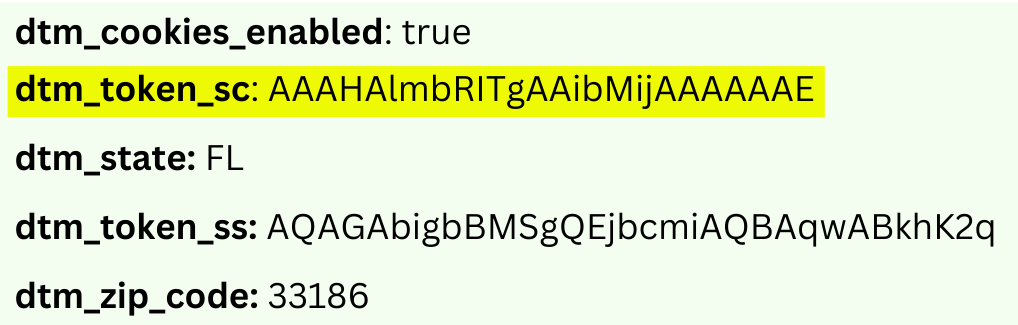
2. Locate the `dtm_token_sc` value in the cookie data.
{% hint style="info" %}
The cookie is not set on a first visit
When a new user first visits your site, the FPC is not yet set. It appears on their first navigation within your site. Start using `dtm_token_sc` once it is available.
{% endhint %}
### Step 2: Pass `dtm_token_sc` in onsite ad request API calls
1. Include the `dtm_token_sc` value in the `dtmCookieId` field of your onsite ad request API calls. This is what ties a user's interactions to the cookie.
2. Pass the customer ID in the `customerid` field to associate the cookie with a specific customer. The customer ID becomes available once the customer logs in to the retailer site.
**Example request**
```http
{
"sessionid": "{SESSION_ID}", // Set to value advised by your CIE.
"customerid": "{CUSTOMER_ID}", // Set to CustomerId value when available.
"dtmCookieId": "{DTM_TOKEN_SC_VALUE}" // Set to dtm_token_sc value.
}
```
**Example response**
```http
{
"sessionid": "SESSION_1", // Set to value advised by your CIE.
"customerid": "CUSTOMER_1", // Set to CustomerId value when available.
"dtmCookieId": "AAAF8xLBTA968AB6TOthAAAAAAE" // Set to dtm_token_sc value.
}
```
For more information on ad request API calls, see [Requesting product ads](/retail-media-interface/integration/generating-ads/product-ads/requesting-product-ads-1.md).
{% hint style="info" %}
Include the cookie in cached calls
If your system caches data or content to improve performance, include the `dtm_token_sc` value in all impression and click event calls. This keeps interactions tracked correctly when data is served from the cache.
{% endhint %}
#### Step 2a: Handle caching
If you have integrated caching, send the `dtm_token_sc` value in your impression and click event calls.
**Impression event example**
```
GET {integration}.citrusad.com/v1/resource/first-i/display_xc0O_S0kqwqS93k972ikrrUDagUKCAoGOTI0NTcxEgIIARoMCI7ew6AGENTCytEDIgIIAQ==?sessionId=SESSION_1&customerId=CUSTOMER_1&dtmCookieId=AAAF8xLBTA968AB6TOthAAAAAAE&event_ts=20230314200515
```
**Click event example**
```
GET {integration}.citrusad.com/v1/resource/second-c/display_xc0O_S0kqwqS93k972ikrrUDagUKCAoGOTI0NTcxEgIIARoMCI7ew6AGENTCytEDIgIIAQ==?sessionId=SESSION_1&customerId=CUSTOMER_1&dtmCookieId=AAAF8xLBTA968AB6TOthAAAAAAE&event_ts=20230314200515
```
### Step 3: Pass `dtm_token_sc` in onsite order API calls
1. Include the `dtm_token_sc` value in the `dtmCookieId` field of your onsite order API calls, so orders and conversions are attributed to the right user.
2. Pass the customer ID in the `customerId` field to link order data to the customer profile. The customer ID becomes available once the customer logs in to the retailer site.
**Example response**
```http
{
"orders": [
{
"customerId": "npc-s243-ir",
"teamId": "9f48572c-0a5b-4997-9a0e-ed74f4d32dc6",
"sessionId": "5cat7-9964-4f",
"dtmCookieId": "AAAF8xLBTA968AB6TOthAAAAAAE",
"orderDate": "2021-12-02T15:00:00Z",
"id": "3h30e938-c158-4d78-a0af-b48bbwfrcss4",
"orderItems": [
{
"gtin": "9891998566P",
"quantity": 3,
"regularUnitPrice": 1.00,
"totalOrderItemPriceAfterDiscounts": 3.00,
"catalogId": "6adb93d0-7he4-4d4e-9b47-e5d3714c976a",
"citrusDiscountAmount": 0.0,
"substitutedFor": null,
"sellerId": "seller_id_601_64"
}
]
}
]
}
```
For more information on order API calls, see [Syncing order data via API](/retail-media-interface/integration/data-api/order-data-1/syncing-order-data-via-api.md).
---
# Agent Instructions
This documentation is published with GitBook. GitBook is the documentation platform designed so that both humans and AI agents can read, navigate, and reason over technical content effectively. Learn more at gitbook.com.
## Querying This Documentation
If you need additional information that is not directly available in this page, you can query the documentation dynamically by asking a question.
Perform an HTTP GET request on the current page URL with the `ask` query parameter, and the optional `goal` query parameter:
```
GET https://help.citrusad.com/retail-media-interface/integration/feature-integrations/integrate-first-party-cookie.md?ask=&goal=
```
`ask` is the immediate question: it should be specific, self-contained, and written in natural language.
`goal` is optional and describes the broader end goal you are ultimately trying to accomplish on behalf of the user. GitBook uses it to tailor the answer towards what is most useful for that goal.
The response will contain a direct answer to the question and relevant excerpts and sources from the documentation.
Use this mechanism when the answer is not explicitly present in the current page, you need clarification or additional context, or you want to retrieve related documentation sections.