> For the complete documentation index, see [llms.txt](https://help.citrusad.com/retail-media-interface/llms.txt). Markdown versions of documentation pages are available by appending `.md` to page URLs; this page is available as [Markdown](https://help.citrusad.com/retail-media-interface/advertiser-reporting/unified-reporting.md).
# Unified reporting
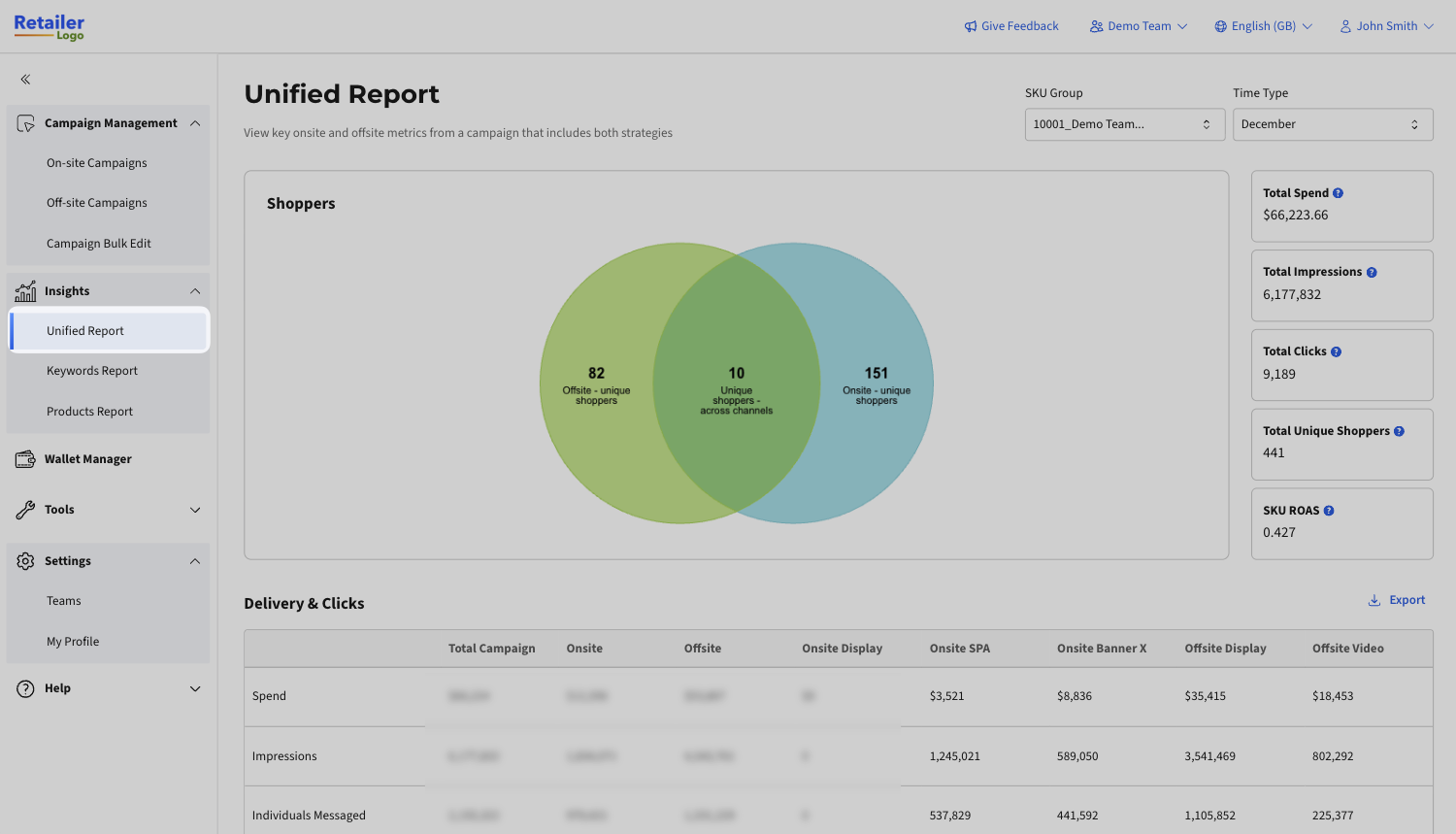
Unified reporting delivers a single, deduplicated view of onsite and offsite performance using fractional attribution. By distributing credit across all eligible touchpoints, brands can clearly understand how different media channels work together and see the true return on their total on and offsite retail media investment, without double counting.
You can use this to:
* **See a complete view:** Analyze online and in-store performance at both SKU and brand levels to understand what drives results, by unique channel.
* **Understand campaign impact per channel:** Monitor key metrics to see which channels drive the highest conversion, enabling more confident optimisation decisions
#### **How to View the Unified Report:**
1. Open the navigation bar on the left
2. Open the Unified Report menu item
{% hint style="info" %}
If you don't see the Unified Report option, it may not be activated for your retailer.
{% endhint %}
Learn everything about the unified report in the clickable guided tour below:
{% embed url="" %}
## Key Information
* The **Shoppers** graph shows you the distribution of unique shoppers that purchase your products across where you have messaged them.
* Unified reporting uses **fractional, multi-touch attribution**.
* If a shopper has interacted with a single channel's ads and purchases, the purchase is 100% attributed to the original channel's ads
* If a shopper has interacted with both an offsite and onsite advertisement, the purchase is 75% attributed to the offsite channel's ads, and 25% attributed to the onsite channel's ads.
* Use the **SKU Group** filter to switch between campaign SKU groups.
* Change the **Time Type** to update the date range.
* Note: the shoppers graph is not shown for custom date ranges.
* Use **Delivery & Clicks** to see overall messaging across channels
* The **SKU Group Performance** table shows unique conversions, orders, items (units), and sales revenue by channel.
* SKU Group performance also includes in-store and online conversions, giving you a complete view of where customers are purchasing.
* **Brand Halo Performance** takes it further, and provides you a full view of overall performance beyond your SKU group, into products that are the same brand that are purchased by messaged individuals.
---
# Agent Instructions
This documentation is published with GitBook. GitBook is the documentation platform designed so that both humans and AI agents can read, navigate, and reason over technical content effectively. Learn more at gitbook.com.
## Querying This Documentation
If you need additional information that is not directly available in this page, you can query the documentation dynamically by asking a question.
Perform an HTTP GET request on the current page URL with the `ask` query parameter, and the optional `goal` query parameter:
```
GET https://help.citrusad.com/retail-media-interface/advertiser-reporting/unified-reporting.md?ask=&goal=
```
`ask` is the immediate question: it should be specific, self-contained, and written in natural language.
`goal` is optional and describes the broader end goal you are ultimately trying to accomplish on behalf of the user. GitBook uses it to tailor the answer towards what is most useful for that goal.
The response will contain a direct answer to the question and relevant excerpts and sources from the documentation.
Use this mechanism when the answer is not explicitly present in the current page, you need clarification or additional context, or you want to retrieve related documentation sections.