> For the complete documentation index, see [llms.txt](https://help.citrusad.com/retail-media-interface/llms.txt). Markdown versions of documentation pages are available by appending `.md` to page URLs; this page is available as [Markdown](https://help.citrusad.com/retail-media-interface/advertiser-reporting/brand-page-reporting.md).
# Brand Page reporting
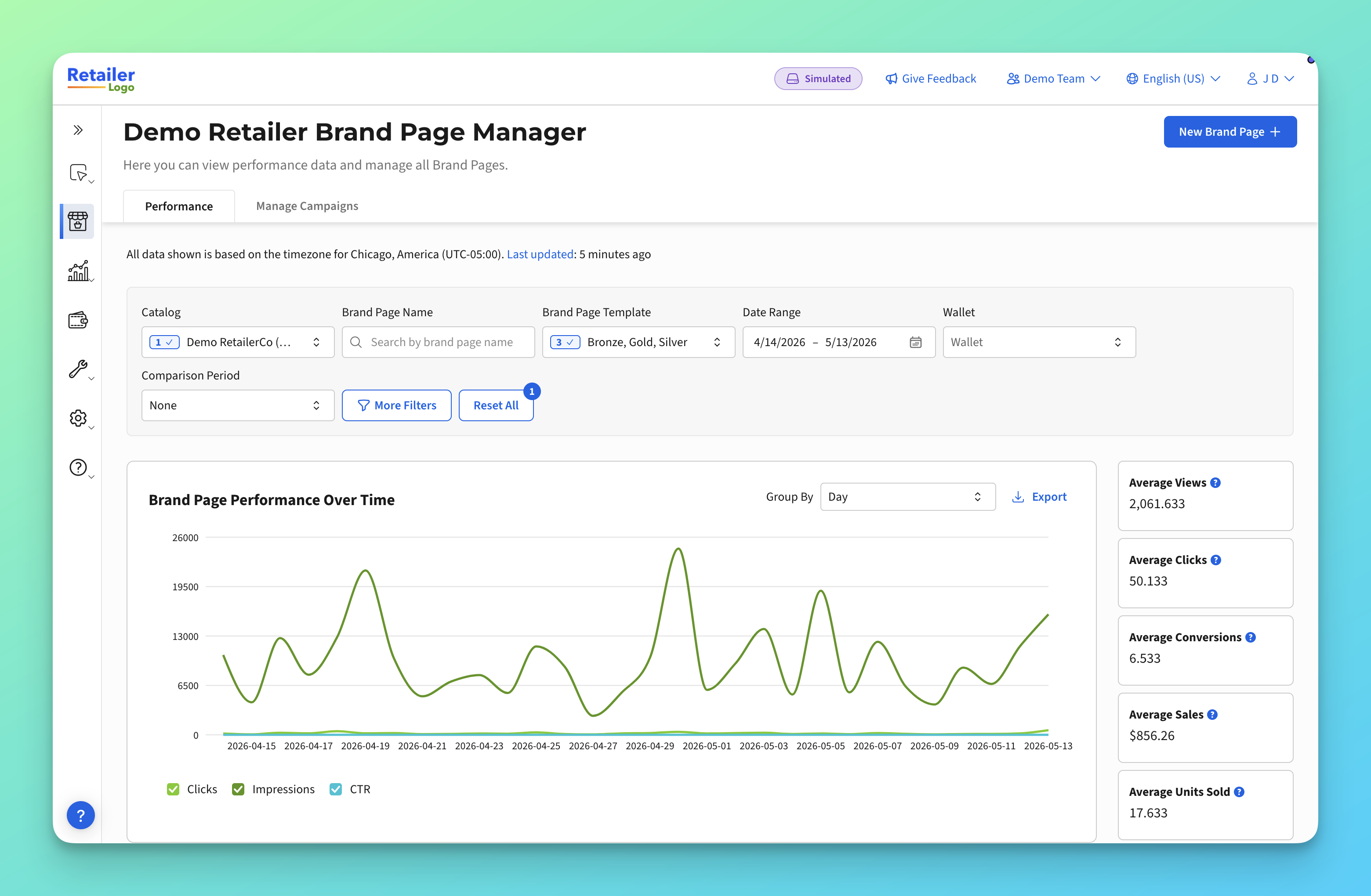
Track how your Brand Pages are performing using the **Brand Page Performance** tab in the platform. This section explains how to access reporting, what each metric means, and how attribution works.
### How to access the Brand Page Performance tab
Navigate to the **Brand Page Performance** tab within the platform. You'll see a summary of key metrics for your Brand Pages.
{% hint style="info" %}
**Tip:** Performance data may take up to 24 hours to fully reflect recent activity, particularly for sales and conversion metrics that rely on attribution.
{% endhint %}
### Available metrics
The Brand Page Performance tab displays the following metrics for each Brand Page:
| Metric | What it measures |
| ------------------------- | ---------------------------------------------------------------------------------------------------------------------------------------------------------------------------- |
| **Views** | The number of times the Brand Page was loaded by shoppers. Each page load counts as one view. |
| **Clicks** | The total number of click actions on the Brand Page, including product tile clicks, call-to-action buttons, and image links. |
| **Conversions** | The number of unique shoppers who made a purchase within the attribution window after viewing or clicking the Brand Page. |
| **Sales Value** | The total revenue from purchases attributed to the Brand Page within the attribution window. |
| **Units sold** | The total number of product units purchased, attributed to the Brand Page. |
| **Visitors** 1 | The number of unique shoppers who viewed the Brand Page within your selected date range. Each shopper is counted once for the period, even if they visited on multiple days. |
| **Views per Visitor** \* | The average number of times each visitor viewed the Brand Page in the selected period. Calculated as Views ÷ Visitors. |
1 Visitors is deduplicated across whichever date range you've selected, not added up day by day. If you add up Visitors from several single days, the total will be higher than Visitors for that same range viewed as one period - this is expected. A shopper who visits on three separate days is counted three times across those daily figures, but only once for the period as a whole.
> **Availability depends on retailer integration:** These metrics are available only when the retailer shares the required shopper identity data with the platform. As a result, some metrics may not be available for all retailers or Brand Pages.
#### Coming later
Additional reporting is in development and will be added to this article as it becomes available.
| Metric | What it will show |
| ----------------------- | --------------------------------------------------------------------------------------------------------------------------------------------------------------------------------------------------------------------------------------------------------------------------------------------------------------------------------------------------------------- |
| **Add to Cart** | The number of times shoppers added a product featured on the Brand Page to their basket. If the same shopper changes the quantity of the same product within a few minutes, it is counted as a single action. |
| **Units Added to Cart** | The total number of product units included in add-to-cart actions on the Brand Page. For example, if a shopper adds one unit and then increases the quantity to five within a short period, it is counted as one add-to-cart action and five units added to cart. This metric helps measure purchase intent volume, not just the number of add-to-cart actions. |
| **New-to-Page** | The number of signed-in shoppers who viewed the Brand Page for the first time. This metric looks back up to 365 days, or since the page went live, whichever is shorter. Because a shopper can be new to multiple Brand Pages, **New-to-Page Visitors** cannot be aggregated across pages or date ranges and does not include a total row. |
Like Visitors and Views per Visitor, all three will depend on retailer integration and may roll out to some retailers before others.
### Understanding attribution
Brand Pages use a **14-day non-competing attribution** model. Here's what that means:
#### How it works
1. A shopper views or clicks on your Brand Page.
2. If that shopper purchases a product that is featured on the Brand Page within **14 days**, the sale is attributed to the Brand Page.
3. The attributed sale is dated to the **Brand Page impression or click date**, not the date of the purchase.
#### Key rules
| Rule | What it means |
| -------------------- | --------------------------------------------------------------------------------------------------------------------------------------------------------------------------------------------------------------- |
| **14-day window** | Only purchases made within 14 days of the Brand Page visit are attributed. |
| **Non-competing** | Brand Page attribution runs independently from other ad types (such as Product Ads or Banner campaigns). The same sale can be attributed to both a Brand Page and another ad type without either losing credit. |
| **Product matching** | Only products that are featured on the Brand Page are eligible for attribution. If a shopper purchases a product that is not on the page, it will not be attributed. |
{% hint style="info" %}
**Tip:** Because attribution is non-competing, you may see the same sale reflected in both Brand Page reporting and in reporting for other campaign types. This is by design — Brand Pages measure influence alongside your other retail media activity.
{% endhint %}
---
# Agent Instructions
This documentation is published with GitBook. GitBook is the documentation platform designed so that both humans and AI agents can read, navigate, and reason over technical content effectively. Learn more at gitbook.com.
## Querying This Documentation
If you need additional information that is not directly available in this page, you can query the documentation dynamically by asking a question.
Perform an HTTP GET request on the current page URL with the `ask` query parameter, and the optional `goal` query parameter:
```
GET https://help.citrusad.com/retail-media-interface/advertiser-reporting/brand-page-reporting.md?ask=&goal=
```
`ask` is the immediate question: it should be specific, self-contained, and written in natural language.
`goal` is optional and describes the broader end goal you are ultimately trying to accomplish on behalf of the user. GitBook uses it to tailor the answer towards what is most useful for that goal.
The response will contain a direct answer to the question and relevant excerpts and sources from the documentation.
Use this mechanism when the answer is not explicitly present in the current page, you need clarification or additional context, or you want to retrieve related documentation sections.